Prepare a new Job Budget (or Job Estimate), set a Price based on Contract Type, and prepare a Job Proposal that will impress your prospective customer and help you get that job! Start a new budget by bringing in all the cost centers from your master OR by copying budgets from other template budgets. Budget for a cost center by using Items behind the cost code, or by using Bids From Trades or Suppliers, or by drilling down to review historical averages for other similar jobs. Mark certain budget lines as Allowances (or Options), prepare an Allowance Agreement, and track Allowance Variances to add or remove from the Contract Price. Prepare Budget Proposals based on the Contract Type for the job, like Fixed Contract, Costs Plus Builder Fee, or Costs Plus Markup, and learn about the difference between those contract types.
🧮 CREATE Professional PROPOSALS Using these tools:
Give clients, vendors, and your team clear, credible numbers—backed by documents, notes, and unit‑based math.
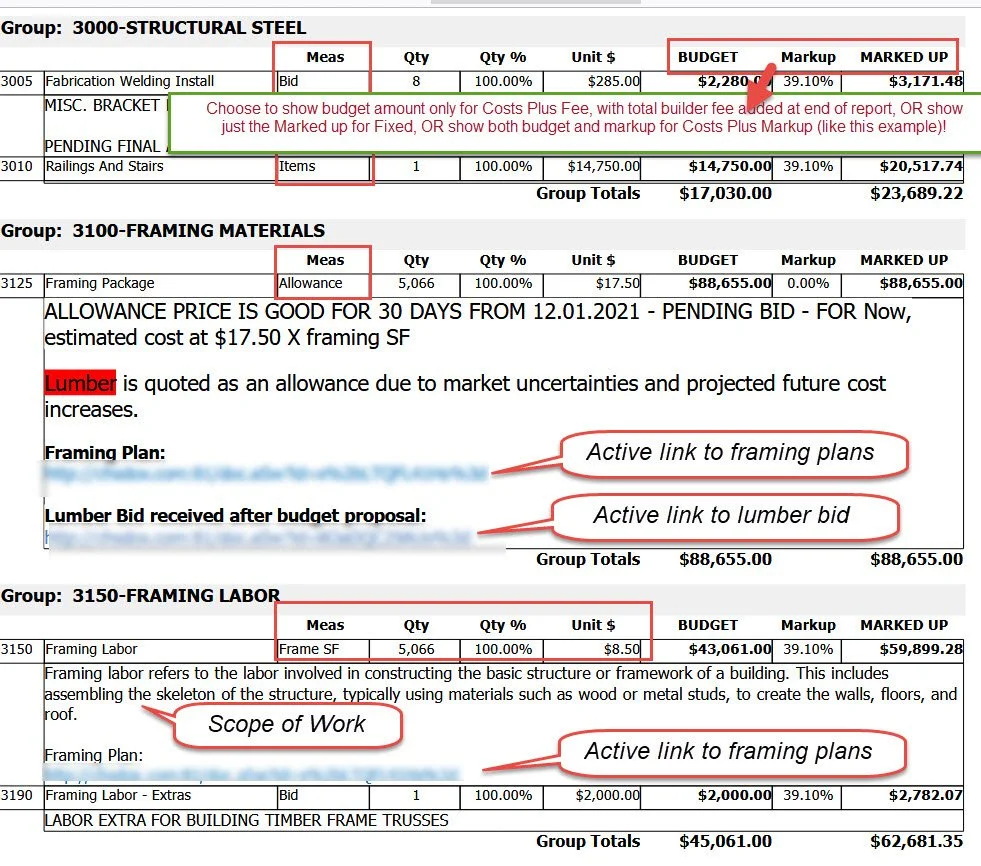
Attach plans where they matter. Upload plan PDFs to the job and drop direct links into each cost center’s notes for instant context.
Reference vendor bids in-line. Store vendor quotes and link them right in the cost center notes—no hunting through folders.
Explain the scope (in plain English). Use rich notes to spell out inclusions/exclusions, site conditions, and coordination details.
Unit‑based budgeting that calculates for you. Set default unit measure (LF, SF, EA, CY, etc.) and unit price—CHS auto‑calculates initial budgeted amounts from your quantities.
Allowances made simple. Flag allowance items, set the amounts, and keep selections and actuals aligned with the budget.
Cleaner handoffs. Anyone reading the estimate sees the “why” behind the number—plans, bids, scope, and math in one place.