

🏗️ CHS Is Construction Accounting, Job Costing, & Financial Project Management—
ALL IN ONE SOFTWARE SYSTEM.
🏡 designed with a focus on custom home builders
So You AND Your Team get real-time answers when you actually need them.
CHS replaces QuickBooks and other generic accounting software with a complete construction accounting, job-costing, and financial project management system — including payables, customer billings, general ledgers, financial statements, weekly progress status reports, list schedules, daily logs, and and much more (BY project!).
⚡ Here's where CHS makes the huge difference.
Your Estimates, Vendor Bids, Change Orders, Purchase Orders, Builder Revisions and Actual Accounting Records ALL live in the same system — CHS!.
So, CHS can instantly review all actual job costs, and then forecast where costs, revenues, cash, and profit stand AND are heading on every project, —without synching to QuickBooks or preparing a bunch of disconnected spreadsheets.
No more hours spent reconciling your financial records to your project management software. There will not be differences to reconcile because those records are all in the same database!
🧮 And CHS Understands Construction Accounting!
Construction accounting is unique—and much of it is usually not taught in standard accounting courses. CHS provides the tools and tutorials to help your accounting team learn to handle it correctly, from setting up each job, best ways to post revenues and costs, and tools to instantly calculate and post WIP, Percentage of Completion, Completed Contract, and final Job Closing.
Because all of your information is part of one system, CHS instantly produces meaningful reports and dashboards that give you AND your entire team the information needed to make timely, profitable decisions.
Instead of asking someone to build your office systems from scratch—or trying to connect dozens of spreadsheets together—you begin with a complete business management system that's already been refined through decades of real-world experience with custom home builders.
CHS even tracks Cash Balances BY JOB and produces a Trial Balance automatically grouped and totaled BY JOB—giving your accountant the detail needed to the answers they need.
The result? Cleaner construction accounting throughout the year and far less hours spent by your CPA to gather and reconcile at year-end—potentially saving many billable CPA hours.
💡 Stop Spending Time synching a project management software to quickbooks!
and then stop Trying To Tie QuickBooks numbers to ones in a project management software!
In CHS, every estimate, change order, purchase order, vendor invoice, customer payment, and accounting transaction is connected through your job codes AND cost codes WITHOUT junking up your Chart Of Accounts. Job Codes AND Cost Codes are set up separately to be used by every accounting and project management record entered in CHS. This structure allows both accounting and project management to be tied together automatically for comparisons and forecasting of costs and profits. It also allows the user to apply combinations of filters to get the results you need from your database.
📊 One System. A Lot of Answers.
Current Estimated Costs At Completion (ECC) • Revised Contract Price • Current Expected Profit • Outstanding Costs • Contract Balance • Cash by Job • Unpaid Cost Approvals • Trial Balance by Job • WIP • Percentage of Completion
All using the same live information your team is already entering into CHS.
🚧 Stop Interrupting The Builder And Each Other
"No One PERSON Should Be the Database."
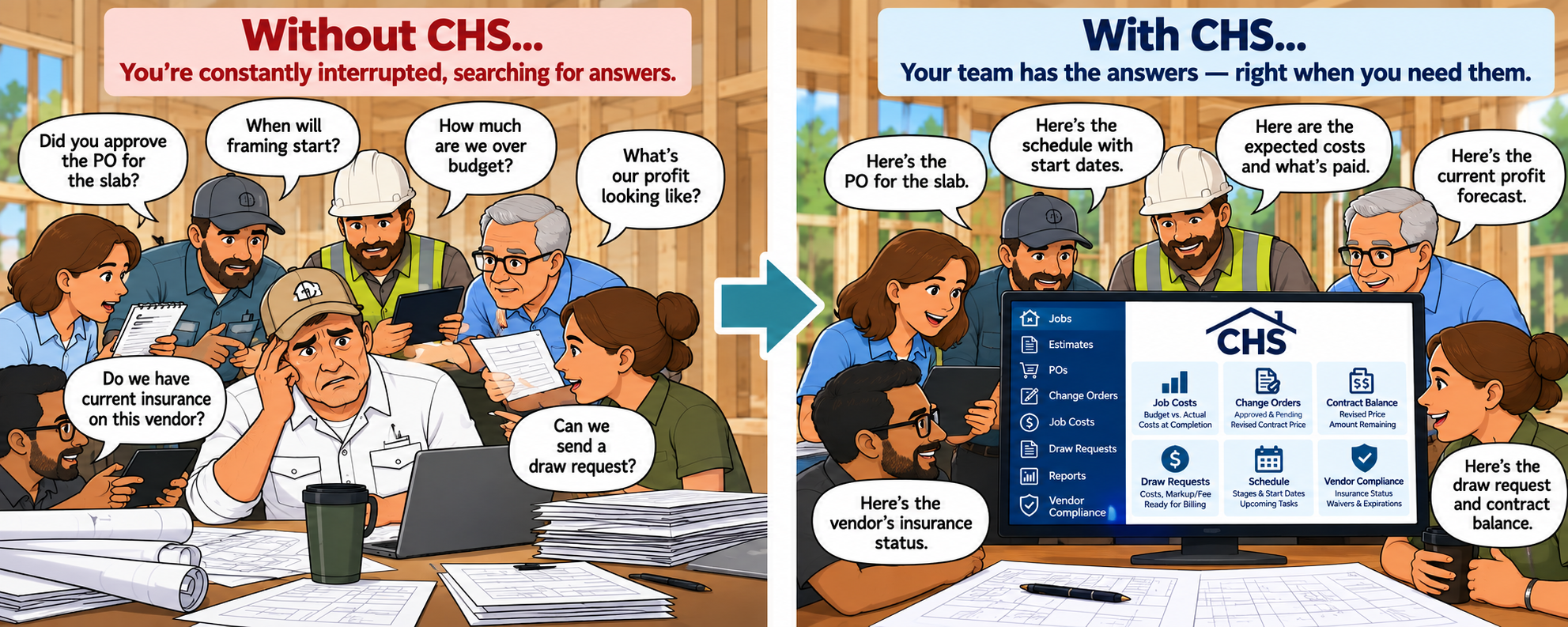
LESS CHAOS. MORE BUILDING.
CHS puts real-time project and financial information at your fingertips—
The builder can focus on customers while the team handles the details!
🏗️ Built for Custom Home Builders — but can be Used Beyond Custom Homes
CHS was born in custom home building—but its accounting and job-costing tools can work anywhere construction is managed by the job.
If you build by the job and need to know where your costs, commitments, cash and profits are heading, CHS may be a fit for you:
✓ Custom & Luxury Home Builders
✓ Remodelers
✓ Semi-Production & Multi-Unit Builders
✓ Developers & Commercial Contractors
✓ Other Project-Oriented Construction Companies
NOTE! CHS is a heavy duty accounting program that can actually be used by all kinds of businesses to take advantage of its high end search and report tools, and convenient data entry tools. One of our customers uses it for their bait and tackle shop! You CAN set up multiple companies under the same CHS subscription and users! Use user permissions to grant access to your users, or not.
CHS IS WEB-BASED, so with role-based permissions, your builders, bookkeepers, project managers, and office staff all work from the same real-time information—without waiting for spreadsheets, syncing delays, or disconnected systems.
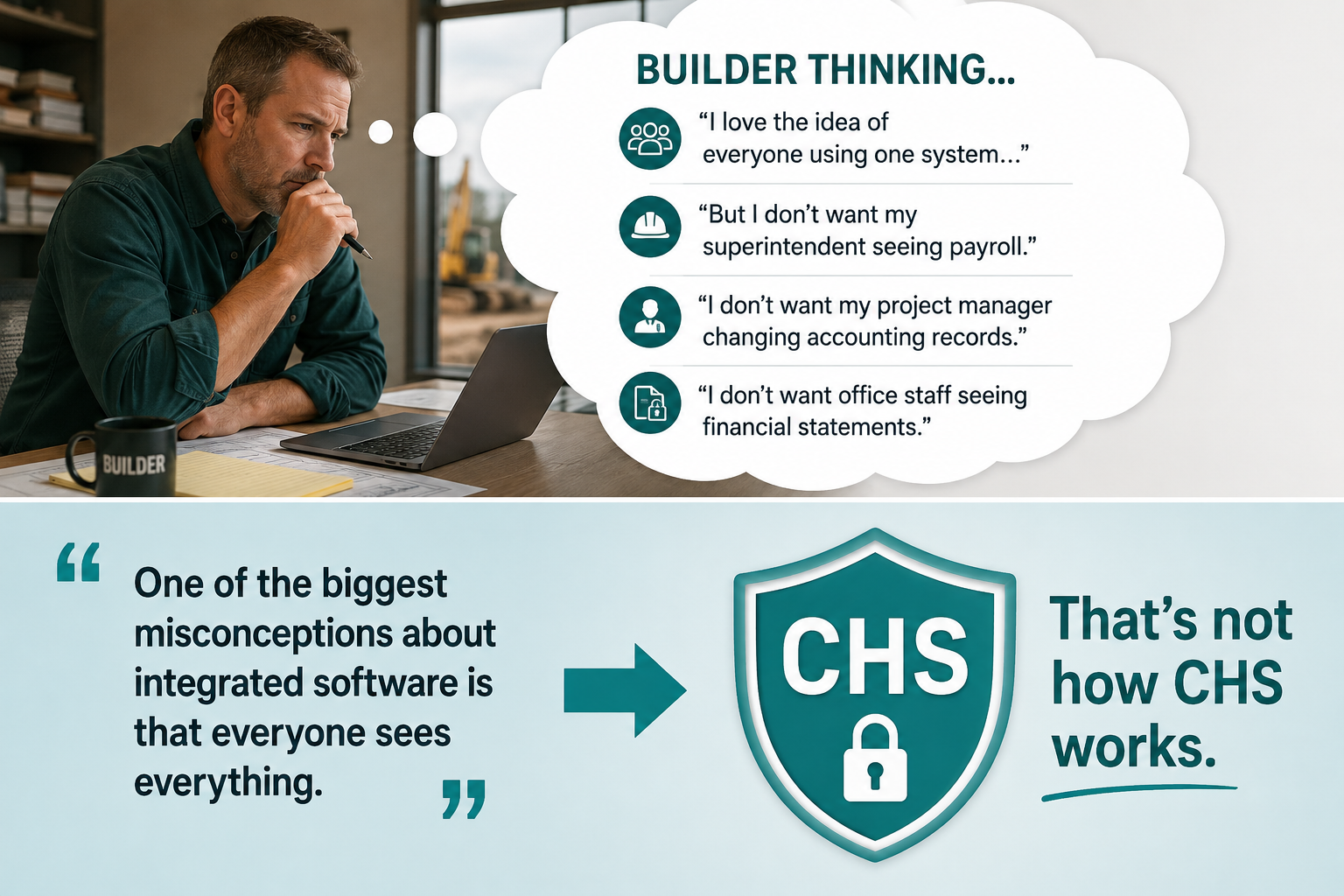
TEAM PERMISSIONS: Every team member has access only to the tools you authorize them to use. For example, you can set up Project Managers to track progress and costs on their jobs, Office Staff to manage their assigned tasks, and only Owner and Accounting Staff to access financial tools.
WHOLE TEAM??? I don’t want everyone to see my accounting!!!
But I DO want the whole team to participate in CHS.
The goal isn’t to lock your team out of CHS. It’s to safely let more of your team in.
MEET CAROL KING, THE FOUNDER OF CHS & IMAGINE HIRING ALL OF HER EXPERIENCE!
“I founded CHS after spending years working as a controller for a large custom home builder. During development and through to today, I continue to work with hundreds of builders & their teams, paying attention to how successful builders manage projects, control costs, and stay profitable.
In many ways, CHS represents the office systems, procedures, and financial controls I would put in place if you hired me personally to organize and manage your business. The difference is that in CHS, those systems are already built, fully tested by builders, and ready for you to use.
I didn't set out to create just another accounting or project management program. I set out to build the complete operating system for a custom home building business.

Carol A King - Founder Of CHS
Accounting Degree With Top Honors
Spent Years As A Home Builder Controller
Teamed Up With 100’s Of Builders
CAROL A. KING - FOUNDER OF CHS
🏆Everything in CHS was built around these 2 goals:
🚧 Empower the entire team to stop interrupting the builder AND each other….
Bring your entire team together in one platform so that all of you can LOOK IT UP YOURSELVES!
Each team member will have a permission level assigned by you that allows them to have access only to the features you authorize them to see and use.
📊 GET CONSTRUCTION ACCOUNTING DONE RIGHT
Handle construction accounting and job costing correctly, so accurate answers, reports, and financial statements are immediately available to everyone who needs them.
Videos BELOW ARE Under Construction! CHECK BACK SOON!
⏱️ Too Many Builders Spend Their Day Answering Questions.
Every interruption of the builder/ owner slows down the person responsible for leading the company.
And when information must always flow through the builder, everyone waits.
Projects wait.
Employees wait.
Customers wait.
Growth waits.
CHS was designed to change that.
💡📊 "Look It Up Yourself!" 😊
Not because we don't want people helping each other. Quite the opposite.
Give Everyone the Power to Find Their Own Answers
(Based on their assigned permission levels!)
One of the biggest time-wasters in a custom home building company is people constantly interrupting each other with questions.
Too often, everyone stops what they're doing to ask someone else:
The builder interrupts the bookkeeper: "Has the draw request been prepared and sent?”
The builder interrupts the bookkeeper AGAIN: “What is the remaining Contract Balance on this job?
The builder interrupts the bookkeeper AGAIN: “How much is left in the flooring allowance?"
The customer waits while someone searches for the answers…
The project manager interrupts the builder: "Who is doing the roofing?"
The office interrupts the project manager. “What cost code to I post this invoice to?”
The project manager interrupts the bookkeeper: “Has the roofer been paid for this job?
The builder interrupts the superintendent: “Are we headed over budget on this job?”
CHS Changes That. The Result?
✅ Fewer interruptions throughout the company
✅ Faster answers for everyone
✅ Better customer service
✅ A more productive team
✅ More uninterrupted time for everyone to focus on their own responsibilities
⭐ THE HEROES ARE YOUR TEAM
CHS helps create an environment where employees solve problems instead of creating bottlenecks.
The project manager who identifies an overage.
The bookkeeper who spots unusual costs.
The office administrator who quickly answers a customer question.
Technology should empower your people—not create more work for them.
👥 EMPOWER YOUR WHOLE TEAM
With permission-based access, each team member can view, add, edit, or approve the information appropriate to their role.
Builder/Owner can quickly see the current profit projections & cash status of all active jobs.
Project managers can manage projects.
Bookkeepers can manage accounting.
Office staff can answer customer questions.
Management can oversee the entire operation.
Everyone works from the same real-time information.
No spreadsheets.
No disconnected accounting program to sync with.
No waiting for answers.
[Learn More About Team Permissions]
📊 CONSTRUCTION ACCOUNTING DONE RIGHT
Most Software Records Transactions.
CHS Creates Answers.
Construction accounting is different.
Builders need answers such as:
What is our projected profit?
What will this project cost when completed?
Are we headed toward an overage?
What is the current contract balance?
How much revenue has been earned?
How much remains to be completed?
CHS was built to answer those questions accurately and instantly.
👷♂️📘 Built From Real World Experience In A Home Builder’s Office
Built by an experienced Home Builder Controller—Refined with input From Hundreds of Builders
CHS wasn’t created in a software lab or by a large software company. It was built from real Controller experience inside a custom home builder’s office—and shaped by the input and wish lists of hundreds of builders.
Carol King, the founder of Custom Homebuilders’ Solutions (CHS).

Why I Built CHS - By Carol King, Founder
“CHS began from my experience working as a controller for a custom home builder, where I saw firsthand the challenges of tracking job costs, managing billing, and understanding where profit actually stood during a project. I built CHS because I had seen too many builders struggle with software tools that don’t understand the complexity & uniqueness of custom homes—or the financial expectations of high-end clients.
A very seasoned home builder also taught me that just comparing the Estimate/Budget to Actual Costs doesn’t really show the builder where they are headed as the job progresses… That simple comparison just shows where they’ve been. SO! I developed the Estimated Cost At Completion tool that is built into CHS to show the builder where the job is headed before the job is finished!
CHS was developed to combine construction accounting and project management in the same system, so that it could instantly recalculate the following for each job:
The Current, Revised Estimated Job Costs as changes occur (Estimated Costs At Completion - ECC)
The Remaining Costs To Complete
The Current Revised Contract Price based on changes
Work In Progress and Revenues Earned so far
The Current Projected Profit
That’s how CHS focuses on helping builders see where the profit is heading on all jobs, WHILE THEY ARE IN PROGRESS, rather than after they close.
As CHS was being developed, I worked with hundreds of builders, incorporating their:
• real-world workflows
• frustrations with existing systems
• and ideas for construction accounting reports they could understand
The result is software that is designed around how builders actually run jobs—not how generic accounting systems expect them to.
CHS was built from real construction experience — not just accounting theory.”
🔄 WHERE PROJECT MANAGEMENT MEETS ACCOUNTING
Most systems separate project management and accounting.
CHS combines them.
Project Management Input
Estimates & Budgets
Change Orders
Purchase Orders
Builder Revisions
Cost-To-Complete Adjustments
Accounting Input
Accounts Payable
Job Cost Tracking
Journal Entries
Draw Request Billings
Bank Deposits
Financial Statements
As builders and project managers update estimates, change orders, purchase orders, allowances, and cost-to-complete projections, CHS combines that information with actual accounting costs to continuously update:
✅ Estimated Costs at Completion (ECC)
✅ Revised Contract Price
✅ Projected Job Profit
✅ Outstanding To Pay
✅ Contract Balances
✅ Percent Complete
✅ Earned Revenue
All information resides in one system.
No syncing.
No exports.
No duplicate entry.
This gives builders and project managers real-time visibility into potential overruns before they become expensive surprises.
At the same time, CHS uses that same information to support Work In Progress reporting, Percentage of Completion accounting, and financial reporting.
The result is something most software cannot provide: accounting and project management working together to help you make better decisions.
🟦 IF YOU CANNOT GET QUICK MANAGEMENT answers FROM YOUR SOFTWARE, IT is usually because MANY HOME Builders Use Accounting Software That Was Not Designed For Construction!
In that case, accounting often lives in one system, and project management lives somewhere else, and spreadsheets try to reconcile everything. So, every time someone asks a question, the answer has to be reconstructed after the fact. The delay isn’t because people aren’t working hard—it’s because the systems used are separate ones.
And IF a system calls itself construction accounting but still relies on connecting to QuickBooks, then accounting lives elsewhere—and answers will always take longer to retrieve or update.
CHS is a fully-featured construction accounting system built with a focus on custom home builders.
CHS also includes its own project management features. CHS was built to replace your generic accounting software. Its purpose is to bring construction accounting and project management data together to live in one system, so answers are immediate and accurate.
And Don’t Worry! You will be able to assign permission levels to your users so that only the proper accounting team can see and manage the accounting and profit features in CHS!
CHS IS the “work-around” the home building industry keeps trying to create with too many spreadsheets. CHS IS purpose-built construction accounting that replaces guesswork and spreadsheets with structure.
⚡🏗️ The whole purpose behind CHS being a fully integrated accounting system was simple:
To give builders AND their team instant, up-to-date answers to critical project management and financial questions — without waiting on delayed QuickBooks integrations or struggling with disconnected spreadsheets.
💼 Stop Waiting On Outside Systems
No more:
Waiting to sync with another accounting platform
Waiting for someone to update spreadsheets
Waiting for answers from disconnected software
With CHS, your accounting, financials, estimates, purchase orders, change orders, job costs, billing, and project tracking tools are all together in one system.
The information you need is already there when you need it.
📈 KNOW WHERE A JOB’S PROFIT IS HEADED BEFORE THE JOB IS FINISHED
THINK OF CHS As Your Job Profit Forecaster!
CHS doesn’t just report accounting history.
It actively uses accounting data and project inputs to calculate and/or forecast the following for every active job:
Estimated Costs At Completion
Revised Contract Prices
Revised Contract Balances
Expected Profits
Projected Overruns
Outstanding Unpaid Costs
WIP - Work In Progress
Earned Revenue (calculated instantly)
Percentage Of Completion Calcs With POC Journal Entry Tool
…all as the job progresses.
That means you can identify problems earlier, make better decisions faster, and protect your margins before it’s too late.
— CHS was built for you.
CHS is built specifically for custom home builders—that’s our specialty and where it shines the most.
HOWEVER! CHS is also being used by remodelers, production builders, and even other types of general businesses. CHS is a high end complete accounting system with many features that can handle the accounting processes for most anyone.
TRUSTED BY BUILDERS FOR OVER 2 DECADES…
CHS has helped builders streamline operations, improve financial clarity, and reduce guesswork for more than 20 years.
🔥 Not just accounting history—
CHS predicts where each job is going.
CHS doesn’t just report what already happened. It actively uses accounting data and project inputs to predict costs, contract value, contract balance, outstanding to pay, expected profit…
and more, as the job progresses.
📋✓ Is CHS Right For You?
CHS is designed for builders who:
Want accurate job costing and reliable financial reports.
Believe accounting is a strategic part of running a successful company.
Value transparency with clients, lenders, and stakeholders.
Want to know what they've truly earned each month using Percentage of Completion accounting.
Are committed to following proven construction management best practices….
The CHS Philosophy
Professional builders don't manage their business by checking the bank balance.
They estimate carefully, control costs, process change orders promptly, enter costs accurately, monitor profitability continuously, and know what they have truly earned each month.
CHS was built around these best practices and remains committed to them.
📞 For Questions About CHS:
Please call us at 512-971-1069 or 512-788-1333….
Regarding Demos: We know custom home builders don't always have time to schedule software demonstrations days in advance. That’s why we remain flexible and encourage you to just call us with any questions that you have.
Please explore our feature demonstrations on this page AND our seminar videos on the Menu bar, at your own pace. Then call us whenever it's convenient for you. We are not into pressure sales, and trust that you will contact us when you are ready.
🏗️📊 CHS Makes Construction Accounting
Much Easier for you AND YOUR CPA!
Construction accounting is very different from ordinary business accounting, and it’s IMPORTANT that both the builder/owner and the bookkeeper understand the differences.
The biggest difference?
Earned Revenue.
In construction accounting, revenue is recognized based on the progress of the job — not simply when cash is received. Who says we need to use Earned Revenue??? NOTE! CHS is flexible and you can enter your accounting records in your own way, but our strong advice is to follow generally accepted Earned Revenue policies.
That means builders need accurate:
Estimated Costs At Completion (ECC)
Revised Contract Prices
Percent Complete calculations
And Revenue Earned calculations
…to produce meaningful financial statements and WIP reports.
The good news?
CHS does the hard work for you.
CHS continuously and automatically calculates:
Revised Estimated Costs At Completion
Revised Contract Prices
Percent Complete
Revenue Earned
Contract Balances
And WIP reporting numbers
…all in one integrated system.
That means:
Less spreadsheet chaos
Less double data entry
Better financial visibility
And potentially huge savings in CPA time and year-end accounting costs.
How To Set Up Your Books For Construction Accounting
Including:
Completed Contract vs Percentage Of Completion
Construction Liability accounts
Work In Progress accounts
Revenue Recognition
And how CHS helps automate the process
And yes…
There will be whiteboards.
📐📊 CHS Is REAL Project Management
REAL Project Management Means Knowing Where every Job Is Heading Financially
CHS is not just project management—and not just accounting.
It combines both to continuously show the financial direction of every job.
Knowing where a job is heading financially isn’t separate from project management—it’s at the core of it.
Since CHS continuously tracks how job costs and the contract price are changing, builders always see the financial direction of the job. See more in the next section farther down.
Monitoring How Costs and Contract Prices Change Is Project Management
That visibility allows builders to:
catch cost overruns early
decide what should be billed next
adjust decisions as the job evolves
and stay in control of profit
The Problem with Split Systems
When project management software is separate from accounting systems:
• cost-to-complete numbers are not instant
• data must be synced between systems
• corrections and cost code changes must be made in multiple places
• and numbers can easily fall out of alignment
Key Insight
When your numbers are not instantly updated, you’re managing yesterday’s job—not today’s.
CHS Approach
CHS combines construction accounting and project management in one system—
so cost changes and contract changes are reflected immediately, in one place.
CHS has list schedules by stage, tasks features, daily job logs, weekly status reports, change orders, and purchase orders that are included in most project management systems.
HOWEVER, Project management isn’t just schedules and tasks.
It’s knowing where the job is heading financially—at all times.
This is CHS’s core philosophy.
🔷 The Two Most Important Project Management Calcs That CHS Does For You
CHS is continuously calculating how 1) expected job costs and 2) contract prices are changing for every active job — so builders can see where profit is heading while the job is still underway.
📊 Estimated CostS at Completion (ECC)
Monitor (AND Adjust) How Expected Job Costs Are Changing every day.
CHS continuously calculates the Estimated Costs at Completion by bringing together:
Original Estimate PLUS Change Order Costs Estimates = Total Budget
Purchase Orders & Work Orders = Committed Costs
PO’s and WO’s make it so that every team member knows who, what, where, and how much.
Actual Incurred Costs = Actual Posted Job Costs (paid or unpaid)
Incurred job costs are costs for labor or materials that have been completed on a job, whether or not they have been paid yet. In CHS, incurred job costs are generally posted using Accounts Payable tools. (Unpaid job costs can be posted. Then job costs can be approved, and checks can be printed. ACH debits AND Credit Card charges for job costs can also be posted. AND job costs paid by your customer can be handled by CHS so as not to impact your cash accounts. )
Builder Revisions = Manual Revisions By Builder
CHS provides a tool that allows builders to enter a revised expected cost for a cost center, overriding the calculated Estimated Cost at Completion. The tool also allows builders to add notes explaining the revision.
As any of the above costs change, the total Estimated Cost at Completion for the job updates instantly—and any impact on the revised contract price is reflected immediately….
2. 📄 REAL-TIME RevisIONS OF Contract PriceS
CHS continuously recalculates revised contract prices based on contract type:
• Fixed Price → adjusted for change order prices AND allowances that are over or under
• Cost Plus Fee → adjusts as expected costs change, plus a percentage of the builder fee based on percent complete (Fee can also be manually entered.)
• Cost Plus Markup → adjusts as expected costs change, plus the contracted markup
As the expected costs change, revised contract prices update automatically.
When These Two Calculations Update, All Of The Following Are Updated:
💰 Contract Balances
(Revised Contract Price Less Revenues Received)
📊 Job Cost Variances
Current ECC Over/Under The Job Budget (or Estimate)
⚖️ Allowances Over / Under
📈 Expected Profits & Profit Variances
📐 Percent Complete
🏗️ Work In Progress (WIP)
💵 Outstanding Unpaid Costs
📝 Notes and Communication
CHS doesn’t just record what happened.
It continuously calculates where the job is heading—so every financial result is always current.
🔥 CHS = YOUR JOB PROFITS FORECASTER!
Generic Accounting software records costs.
CHS proactively uses job cost data to show where job profits are headed WHILE jobs are in progress!
🔷 CHS Tracks Cash Balances By Job!
So that you do NOT need to set up multiple bank accounts that have to be reconciled.
💵 Job Cash Tracking - See the Cash Position of Every Job
CHS tracks cash balances by job—so builders always know how much has been received, how much has been spent, how much is currently due to be paid, and what cash will is available — for every job.
CHS instantly shows the current cash balance for each job, with the ability to drill down into the details.
Builders can quickly see the details for:
how much has been received
how much has been paid out
how much is currently due
and how much cash is available
Drill down to view payments made:
• by check
• by ACH
• by credit card
• or directly by the home buyer
Instantly see whether it’s time to request money from the homeowner or their bank.
Again, CHS shows both the:
• current job cash balance
• AND the posted but unpaid payables
So builders can see how much cash will remain after paying outstanding bills.
This makes it easy to decide whether a draw is needed from the homeowner or their bank. See next section below about the Draw Request Billings that CHS prepares for you!
The job’s cash balance is visible directly on the Estimated Cost at Completion worksheet, keeping financial direction and cash position in one place.
Know your cash position before you run short—not after.
🔷 Suggestion! Instead of spending days gathering numbers for billings, let CHS prepare the billings for you…
AND STOP using traditional Accounts Receivable for job cost billings!
📄💰 CHS suggests that you replace traditional Accounts Receivable with CHS’s Draw Request Billings, Revenues Received, and Contract Balances—a simpler way to track what is owed on every job.
Note: CHS does include traditional Accounts Receivable features, but for job billings, the draw request billing and contract balance tools provide a clearer, more effective approach.
Instead of invoices and A/R, use CHS to create & track:
• Builder-Focused Draw Request Billings
• Revenues Received
• Current Calculated Contract Balances
Contract Balance = Revised Contract Price − Revenues Received
This gives builders a clear, real-time view of what is still owed on each job.
💰 Draw Requests BILLINGS (2 types)
CHS supports draw requests that match how builders actually build—based on the contract type and job progress.
📊 1)Cost Plus Draw Requests
Draws are created based on costs that have not yet been drawn.
CHS automatically applies:
• builder fee (percentage or flat)
• or markup
depending on the contract type.
📄 2) Fixed Price (Lump Sum) Draw Requests
Draws are calculated using percent complete by cost center.
Each cost center contributes to the draw based on its current progress.
🔧 So billing stays aligned with:
• actual costs
• job progress
• and financial position
🔷 Transparency for the Home Buyer
CHS can produce a detailed draw report showing the costs behind each request.
This includes:
• supporting cost detail
• and links to copies of vendor bills
Builders can show exactly what they are billing for—with full supporting documentation.
🔷 Why This Suggestion Is Better ThAn Using Typical Accounts Receivable (A/R)
Generic accounting systems usually use Accounts Receivable to do job billings, but that often leads to:
• confusing over or under billed GL accounts
• disconnected job financials
• extra reconciliation work
CHS eliminates that complexity by tying billing directly to each job’s costs incurred or percent complete.
There is an Owner’s Report that lists all active jobs with this information:
• what the jobs’ Revised Contract Prices are
• what has been collected for each job
• current Contract Balance for each job (so THIS replaces A/R for active projects!)
No A/R invoices cluttering up the books. No over or under billings GL accounts.
🔥 Just clear, job-based Contract Balance Tracking.
👷 Not More Than You Need — Exactly What Builders Need
Some builders worry that construction accounting software may be more system than they really need. CHS isn’t more accounting system than builders need — CHS is the accounting structure builders actually need.
CHS was designed specifically for home builders, based on decades of hands-on experience working with construction companies and supporting the accounting teams who manage their projects.
Because of that experience, CHS focuses on the financial structure builders actually need:
• connecting estimates, purchase orders, change orders, and job costs
• maintaining accurate job cost reports
• helping bookkeepers avoid common accounting mistakes
• giving builders clear visibility into project profitability
CHS is not extra complexity. It is the structure required to manage construction projects with confidence.
The design of CHS reflects decades of experience working with builders and their accounting teams, learning firsthand where traditional accounting systems fall short for construction projects.
Luxury custom builders trust CHS to simplify their accounting, protect profits, and impress their clients.
💬 A Couple of Our Builder Testimonials
“I would highly recommend CHS for any size residential construction company. We have been using CHS on the build side of our design-build architecture firm for years. By far, the best feature is the ability to have the job cost/profit management and the accounting all in the same place. No need to sync with, or export to another accounting software.”
Charles Kraus, Kraus Associates - Architect-Led Design/Build
“I have used CHS for years and it has been a great asset to my company. Estimating, job costing, billing draw requests, accounting etc., it does it all. I wouldn't consider any other software. Thanks for everything Carol!”
Charlie Cooper, CB Cooper Construction
👥 CHS! Where Your Entire Team Works Together — Based on assigned permission levels!
“I built CHS so that a builder’s estimate, change orders, and purchase orders could live in the same system as all the job costing accounting data—because that’s what it takes to get instant cost comparisons and accurate profit projections.” Carol King, Founder of Custom Homebuilders’ Solutions (CHS)
CHS isn’t just accounting software—it’s a collaborative platform that brings your entire team together while keeping financial control in the right hands. From the office to the field, CHS gives every key player the tools they need to make smart, timely, and financially sound decisions—with permission levels set by you.
Say goodbye to time-eating spreadsheets and scattered systems that cause you to wait for answers you need now. CHS gives you one unified platform, full of instant answers that make you and your whole team feel confident and in control.
From estimating to project tracking to financial statements, your numbers live in one place—working together in real time—to show you exactly where each project stands at any moment.
🏗️ ≠ 🧾 AGAIN, construction accounting is not the same as general business accounting.
Home building requires different accounting procedures than other businesses because….
Different Types Of Contracts can be used for each job:
Lump Sum Fixed Price contract
Costs Plus A Markup contract
Costs Plus A Builder Fee contract
Original Contract Price can change due to:
On Fixed Contracts:
Change Orders
Job Costs Over or Under Allowances
On Costs Plus Contracts:
Estimated Costs At Completion Change
The IRS allows 2 timing choices for recognizing Revenues for each job:
Completed Contract Method
Percentage Of Completion Method
Most generic accounting software simply was not designed to handle construction-specific accounting requirements, like the above, properly.
And because these concepts are not typically covered in standard accounting courses, bookkeepers are often forced to create workarounds inside software that was never built for builders. Over time, those workarounds can distort job costing, complicate WIP reporting, and create financial statements that are difficult to explain to banks, CPAs, or auditors.
CHS is construction accounting software designed specifically to eliminate those workarounds — giving custom home builders, bookkeepers, and CPAs the tools they actually need. And while Carol King, the founder, cannot be your accountant, she likes to help guide you through the best methods for setup and use of CHS to accommodate your specific needs!
👉 👤📞 Built by a Founder Who Still Answers the Phone
When you call CHS, there’s a good chance Carol King, the founder, will answer.
Not because we’re small — but because CHS is built solidly and runs reliably. That gives Carol the freedom to stay connected to the builders whose ideas shaped the system in the first place.

BUILDER: “The software works so well that I have only had to reach out to Carol and her team a handful of times over the entire 12 years. That speaks volumes! By far, the best feature of this software is the ability to have the job cost/profit management and the accounting all in the same place. No need to sync with, or export to another accounting software. I have searched over the years and I have not found another software that can singularly provide both of these functions. As an experienced controller for home builders, I am sure Carol had this in mind when she created this software.” —Kraus Associates See more…
BOOKKEEPER: “Carol has thought of everything. I love it when CHS protects me from making date errors and watches for possible accounting mistakes. And when I don’t know how to do something, her detailed tutorial videos teach me how to do everything in CHS, with many tips about Construction Accounting!'“
That’s intentional.
CHS was built specifically for luxury and semi-custom home builders who need accurate financial reporting, job costing clarity, and reliable numbers for banks, insurance audits, and homeowner transparency.
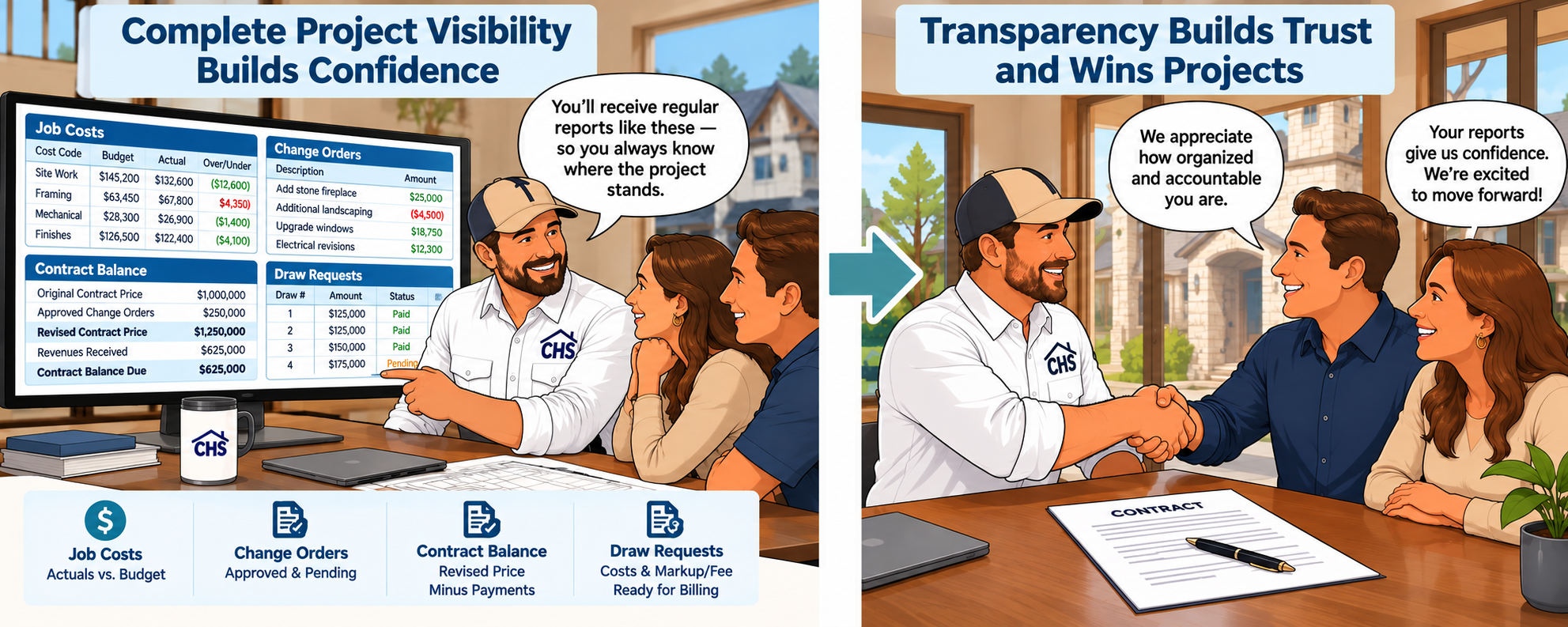
🟦 CLOSE THE DEAL! SHOW your prospects your accountability! show them sample CHS Reports.
Clients need to know the difference between average and excellence before they choose a builder!

🧾 Transparency Your Clients Can See
Your clients are investing in more than just a home—they’re investing in you. With CHS, you can give them the transparency and professionalism they expect at every step.
When your accounting, job costing, and project management are all in one software, your office can run like a well-oiled machine, inspiring your clients to recommend you with enthusiasm.
Impress Your Prospects by showing them:
Professional Job Proposal - Based on selected Contract Type & your own header & footer
Stage-based weekly job status updates.
Sample Change Orders and how they can approve them online.
Sample Allowances status reports
How you can provide clear, itemized Billings (aka Draw Requests) for cost-plus or fixed-price jobs. Present up-to-date contract balances due, automatically calculated based on the contract type—whether fixed-price or cost-plus.
How you can use CHS’s tools to auto prepare billings & recalculate Contract Price & Contract Balance based on contract type, revenues received, and changing estimated costs, to do away with clunky Accounts Receivable and over/under billing entries!
“We have been working with CHS for years and it has been a great product for us. It offers a very stable financial and job costing platform and works great for fixed price, fixed fee or cost-plus. It's comprehensive and scalable.” Phillips Homes
“We have really liked using CHS. I love how we can give a Costs Plus home buyer access to see their actual job cost vendor invoices when we do a Draw Request Billing using CHS, and that we don’t have to spend time making copies of vendor invoices for the customer anymore.” —Todd at Todd Homes
Structure AND Flow Of CHS
Cost Code Centers Keep Estimates Structured and Costs Traceable
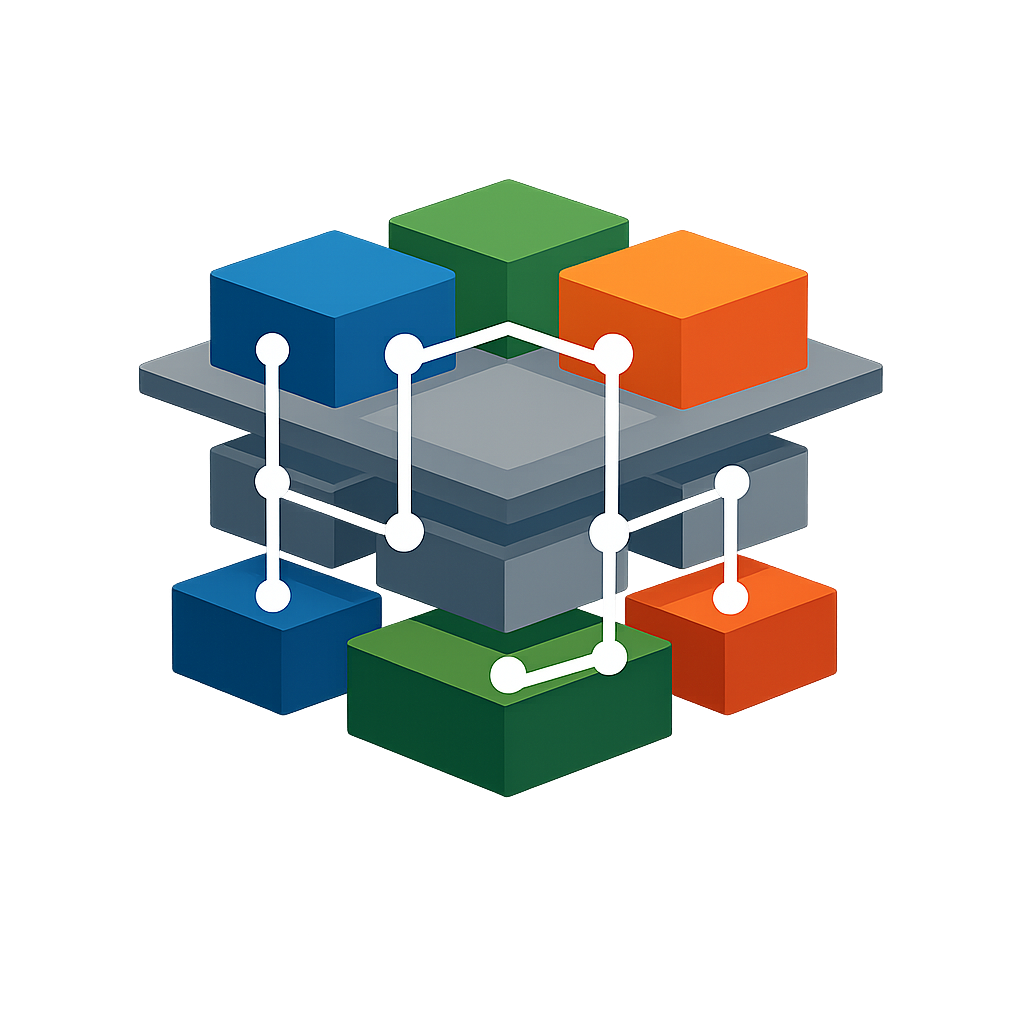
Cost code centers give estimates the right structure from the beginning and keep that structure consistent across change orders, purchase orders, actual job costs, and builder revisions. Because all of these transactions require a cost code, CHS makes it easy to compare each phase of the job using the same cost framework.
CHS also keeps cost codes separate from GL account numbers. Accounting records can store both, which allows builders to maintain a clean chart of accounts while still capturing detailed job-cost information. Cost codes are used only on records tied to a job code, and CHS provides a generic job code for expenses that are not job costs. That keeps the accounting structure clean while preserving powerful job-cost reporting.
The result is cleaner accounting, better filtering, and stronger cost analysis by job, vendor, and cost code.
Clean accounting. Better job costing. Stronger comparisons.
🟦 CHS: CONSTRUCTION ACCOUNTING AND PROJECT MANAGEMENT SOFTWARE IN ONE SYSTEM
CHS is not an add-on to QuickBooks.
It replaces generic accounting software with a fully integrated construction accounting and project management software platform built specifically for custom home builders.
QuickBooks Records The Past And Tells You What A Job Has Cost So Far.
CHS Shows You Where The Job & Its Profit Are Heading While Job Is Still Underway.
Accounting and project management live in one system:
When Estimates are finalized and Contract Prices are set, estimated profits and contract balances adjust automatically, based on the selected Contract Type.
When Purchase Orders are issued, everyone knows who, what, where, and how much, regarding every cost center for a project. Purchase orders SAVE your team’s time and instantly cause total estimated costs to recalculate.
When job costs are entered in accounting, Estimated Costs at Completion instantly recalculate AND Estimated Profits AND Cash Available per job update in real time.
When Change Orders are approved, contract prices, estimated profits, and contract balances adjust automatically.
No syncing between systems.
No duplicate data entry.
No spreadsheet reconstruction.
Just real-time construction accounting that reflects reality.
🟦 WHAT WE MEAN BY PROJECT MANAGEMENT
Project management inside CHS is not just task tracking.
It is financial and operational control — working together.
Budgeting & Estimating
• Create detailed budgets and estimates
• Monitor expected costs and projected profit
• Track Estimated Cost at Completion
• Compare budget to actual in real time
Purchase Orders & Vendor Control
• Issue and track purchase orders
• Check off completed work
• Document retainage
• Monitor vendor insurance expirations
• Track compliance documentation
• Request updated certificates
Change Orders & Contract Control
• Create and approve change orders
• Update contract values automatically
• Track allowance adjustments
• Maintain accurate contract balances
Monitoring Costs & Profitability
• Monitor projected overages early
• View cost code variances
• Add notes explaining changes
• Protect margin before it disappears
Schedule & Field Management
• Maintain the list schedule
• Post daily job logs
• Prepare weekly status reports
• Document field progress
Communication & Documentation
• Message team members inside jobs
• Communicate with customers
• Store invoices and bids
• Maintain waivers of lien
• Prepare insurance audit support
🟦 THE BOOKKEEPER BECOMES THE HERO
As payables are entered, CHS alerts the bookkeeper to:
Budgeted Cost code overages
Purchase Orders overages
Vendor insurance expirations
Missing compliance documents
Potential accounting errors
From the payables window, they can:
Drill down to related purchase orders.
Auto fill payables data by selecting a related PO.
View uploaded vendor bids.
Upload and attach copies of the vendor invoice.
Send & store notices to team members about overages.
Send & store questions to the vendor about their invoice.
Lookup all past invoices from vendor, paid or unpaid.
Request updated certificates from vendors.
Bookkeeper can select various ways to mark an invoice as paid.
Post as PAID via an ACH debit or check
Post as PAID by a selected credit card
Post as PAID by an outside party (CHS handles the proper posting )
Post as UNPAID to pay later
THEN it’s time for the bookkeeper to let the big boss and/or project managers know that they can log onto CHS and open the tool to approve posted unpaid invoices. AND that they should review the Estimated Costs At Completion for their jobs and make notes about any overages.
Now the bookkeeper is not chasing paperwork.
They’re protecting the company.
That’s not burnout anymore.
That’s leadership.
That’s when the bookkeeper becomes the hero.
🟦 THE PROJECT MANAGER BECOMES THE JOB COST PROTECTOR
Project managers don’t just manage schedules.
They also manage profit margins by monitoring job costs, based on permission level.
CHS gives them visibility into the following data for their assigned jobs:
• Estimated Cost at Completion for every cost code
• Projected overages in real time
• Variance notes explaining why costs are trending
With assigned permission for the job, the project manager can:
• Correct miscoded job costs and write notes explaining overages.
• Drill into invoices and related POs.
• Review unpaid posted job costs.
• Approve costs after reviewing documentation.
• Check off completed purchase orders as Work Done.
• Alert bookkeeper about any deductions that should be taken from a Purchase Order.
And beyond cost control, with assigned permissions, project managers can:
• Maintain list schedules
• Post daily logs
• Prepare weekly status reports
• Document field progress inside the job
They’re no longer reacting to accounting after the fact.
They’re managing financial and operational performance together.
That’s when the project manager becomes the hero.
🟦 WHEN CONSTRUCTION ACCOUNTING AND PROJECT MANAGEMENT WORK TOGETHER
🟦 WHAT CHANGES….
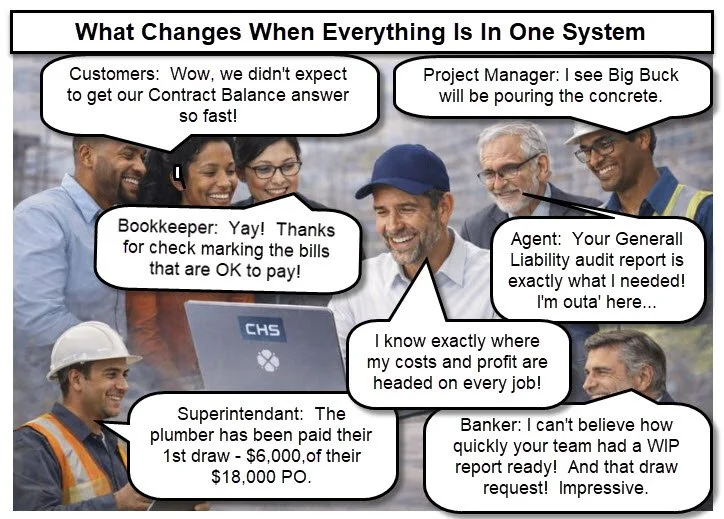
The questions don’t stop.
But no one is waiting.
The bookkeeper catches financial risk early.
The project manager protects job margins and schedules.
The owner sees accurate, aligned numbers.
Accounting and project management live in one system.
🟦 FULL CONSTRUCTION ACCOUNTING CAPABILITIES
CHS supports:
• Completed Contract accounting
• Percentage of Completion accounting
• Accurate Work in Progress (WIP) reporting
• Real-time Estimated Costs at Completion
• Contract balance calculations
• Financial statements by company, job, or department
All designed specifically for custom home builder accounting.
🗓️❌ NO LONG-TERM COMMITMENTS
Stay because CHS works—not because you’re locked in.
We believe software should earn your loyalty, not demand it. CHS offers flexible subscription options with no contracts or long-term obligations. New customers start with a one month term, and once they see the results, they often choose to stay longer—on their own terms. Renew for 1 to 12 months as needed. Renewals are easy to manage from your own dashboard and CHS never requests or stores your payment credentials.
View Fee Structure and/or Sign Up.
🟦 WHY CUSTOM HOME BUILDERS STAY WITH CHS
There are multiple reasons why so many builders renew for a full year — even though they are free to renew month to month.
Because when your construction accounting software and project management tools finally work together…
You don’t want to go back to disconnected systems.
Testimonials…..
⚠️ WHY YOU SHOULDN’T QUICKLY DISMISS CHS
Just because you already have accounting software doesn’t mean you have the right solution.
CHS doesn't do away with accounting—it gives you a smarter, construction-ready way to manage it. It has your financials, estimates, change orders, purchase orders, actual job costs, customer billings, contract balances due, document storage, and more, all in one software—eliminating sync issues, duplicated data, and costly guesswork.
If you're serious about building luxury custom homes, don't overlook the software built for exactly that. For example, CHS has instant reports like:
TRIAL BALANCE GROUPED & TOTALED BY JOB (totals each General Ledger account BY JOB)
TRIAL BALANCES & CASH FLOW FOR WHOLE COMPANY, EACH JOB, or EACH DEPARTMENT
CASH BALANCES & UNPAID PAYABLES for EACH JOB
OUTSTANDING JOB COSTS TO PAY for EACH JOB
PROJECTED GROSS PROFITS for EACH JOB.
CURRENT CONTRACT BALANCES FOR EACH JOB
WIP REPORTS FOR ALL ACTIVE JOBS
BALANCE SHEET FOR WHOLE COMPANY As of Selected Date
INCOME STATEMENTS FOR SELECTED RANGE OF DATES - For Whole Company, Job, or Department (aka Profit & Loss Statements)
And, most importantly, CHS instantly calculates WIP earned income for you BY JOB, using Percentage of Completion, and helps create the POC Journal entries, if needed, for you at the click of a button….all these things, and more, means greatly reducing the year-end scramble by your CPA.
Click this for more info AND a video about WIP & Percentage Of Completion!
📉 Reduce Year-End CPA Costs
Save on CPA fees—and avoid the year-end scramble.
CHS supports multiple accounting methods, including Percentage of Completion, giving you and your CPA the flexibility to choose what works best for your business.
If you use Percentage of Completion—the method the IRS generally requires and prefers for home builders—CHS makes it easy to apply throughout the year, not just at tax time. That means your revenue, job costs, and contract balances are always aligned and audit-ready.
Your CPA won’t have to spend hours reconstructing job income or sorting out expenses. CHS tracks earned revenue in real time, by job, with no guesswork and no last-minute cleanup.
And because CHS helps you apply the method consistently, there’s no need for your CPA to reverse accruals or rework your books at year-end. Everything stays organized, accurate, and in sync with how your business truly performs.
⚡Best of all, CHS helps prevent surprises with instant answers!
Buyers, trades, suppliers, AND your team stay informed as the job progresses, which means fewer questions, fewer disputes, and no last-minute sticker shock. You’ll build trust, protect your margins, and maintain a professional image from the first draw to the final closeout.
Proven and trusted. CHS has been in use by several hundred professional home builders for over 2 decades. They say, “CHS is our best kept secret!”
🟦 VIDEO: Introduction to CHS Founder AND A SUMMARY OF CHS FEATURES
📊 Free Tool: Find the Right Markup!
Confused about markup vs. margin? You’re not alone.
Click below to use our free calculator that shows you exactly what markup percentage you need to hit your desired profit margin—and finally understand the difference between markup and margin once and for all.👉 Click here to try the free markup tool now!
See CHS Team Collaboration in Action:
🚫 STOP MOVING Overages to a Contingency Cost Code & SAVE TIME! no need with CHS clarity!
WHY?? BECAUSE CHS HAS THE ESTIMATED COSTS AT COMPLETION WINDOW THAT CLEARLY SHOWS OVER & UNDERS AND TOTALS THEM UP FOR YOU AND YOUR COSTS PLUS CUSTOMERS!!
It might be tempting to move overages from a specific cost code into a general contingency code—but doing that can actually create more problems than it solves. Click this to see why we recommend leaving the overages in their original cost code.
💼 Step Into the Role of the Professional Builder
You’re not just building homes. You’re building a business that lasts. The builders who choose CHS are stepping into the role of business owner, —not just managing job sites, but building a company.
👷 Builder Leadership
📊 Professional Financials
🤝 Client/Vendor Trust
CHS builders are the ones who:
Know exactly where every job stands, in real time
Present confident, accurate numbers in every meeting with clients, bankers, staff, etc.
Grow their companies without losing financial control
Are respected not just for what they build—but how they run their business
By centralizing your operations, CHS enhances communication, reduces errors, and streamlines project management from start to finish.
🧭 DIVE INTO OUR FEATURES & TUTORIALS
Yes, there’s a lot on this page—because custom home building isn’t simple.
You're not just managing projects—you’re coordinating with clients, project managers, bookkeepers, lenders, insurance agents, trade partners, suppliers, your client’s banker, AND your internal team of estimators, PMs, and accountants. CHS is built to support all of them—while keeping you in control. So yes, this page is long. But every part of it is here because building high-end custom homes takes more than just basic tools.
Click a link to go to learn more about some of our features!
Job Budget Estimate
Customer Selections - Handle Them The Smart Way!
Estimated Costs At Completion (ECC) A lot of builders think comparing estimated costs to actual posted costs is all they need to see how a job is going. But here’s the problem: That comparison is mostly meaningless—until the job is complete! Use our ECC tools to see where you really stand! more…
Purchase Orders & Other Project Management Features
Payroll & Employer Burden — Handled Right!
💡FAQs
Does CHS Support Cash, Accrual, or Both?
Short Answer:
CHS is built for accrual-based job costing, the professional standard for construction accounting. It supports both of the IRS-approved methods of revenue recognition for construction:
📘 Learn More: Why CHS Focuses on Accrual
Do You Offer a Free Trial of CHS?
No. CHS setup is personalized, and rushing through a trial undermines your foundation. CHS is a long-term investment in the strength of your business.
How Do I Set Up CHS?
There is an on-screen step-by-step setup guide and tutorial videos. Each team member (builder, PM, bookkeeper) is involved in setting up their own part—ensuring your system is built right from the start.
🎯 Built for Custom Home Builders
SO there are some things we do NOT include ….
BECAUSE CHS IS based on our extensive experience with custom home builders.
At CHS, our mission is clear: we don’t try to be all things to all people. Both our founder and resident builder bring decades of custom home building experience—combined with decades of input from many other builders—and that collective knowledge has guided us on what to include and what not to include. We’ve learned that stability and clarity come as much from what you leave out as from what you build in.
That’s why CHS is:
Designed specifically for luxury custom home builders, not every type of contractor.
Clean and uncluttered, without the gimmicks, add-on apps, or third-party gadgets that break down over time.
Extremely stable, because every feature was chosen with intention, not bloat.
🛠️ Examples of Our Clean Philosophy OR Things We Do Not Include
Provide An Alternative to Customer Online Selections: Instead of managing endless “selection lists” inside the software, CHS is built for the real-world approach—sending customers directly to vendors. Vendors know their own product lines best, and CHS makes sure costs still get tracked where they belong. More…
No bank feeds: They sound convenient, but they’re a very poor fit for job costing. Builders need costs posted where they belong—not dumped in from a bank feed that hides the detail. CHS is designed for accurate posting tied to vendors, cost code centers, jobs, cost types, stages, AND of course, general ledger accounts . More info…
We Do Not Recommend On-Site Time Tracking: Some systems encourage builders or project managers to log their time on each job—to “prove” what was spent where. But that approach doesn’t fit custom homebuilding, and it often backfires.
Here’s why we skip it:
It creates unnecessary friction with buyers.
Tracking and charging builder or manager hours can make clients feel nickel-and-dimed—especially when they’re already paying a markup designed to cover overhead.It adds needless data entry and adjustments.
Recording, categorizing, and applying time to job costs takes hours each week—and leads to reconciliation headaches.It complicates job cost reports.
When you mix wage costs into job data, it blurs true profitability and inflates direct job costs.
CHS keeps it simple.
Instead of tracking hours, you use our Markup Tool to determine the right percentage to apply across your jobs—covering your overhead, including salaries and wages.
That approach keeps reporting clean, pricing consistent, and buyer relationships positive.✅ No timecards.
✅ No awkward cost justifications.
✅ No double entry.
Just straightforward, accurate pricing that covers your business expenses and preserves your professionalism.No quick switch to Cash method: CHS is a true job costing program. That means accrual accounting—because only accrual shows your real profit and contract position as jobs progress. CHS instantly calculates Work in Progress (WIP) and Percentage of Completion, and it includes the tools to manage both Completed Contract and Percentage of Completion methods of accounting with ease. And, pssst, if you ask us, we will give you a hint about using Percentage Of Completion, and then quickly reversing it at year end, and un-reversing it the next day, if needed, for cash basis.
No Gantt Chart Schedules: Some software sticks in Gantt charts because they look impressive on a demo. But in real custom builds, in our experience, they quickly become cluttered, rigid, and out of date. CHS uses simple List Schedules instead—because they:
Give clear visibility into what’s due and what’s behind.
Are easy to update when plans shift (as they always do).
Match the way builders and project managers naturally think—by tasks, not abstract bars.
👉 Bottom line: CHS reflects decades of hands-on experience and builder feedback—stable, practical, and intentionally focused—because we know what actually works for custom home builders.
Monitor & Predict where all of your job costs, gross profits, & contract balances are heading every day for every project. CHS keeps your entire team AND your customers informed in real-time! High end custom builders rely on CHS for clarity, control, and client-ready financials.
CHS can be a trusted partner, keeping you informed, delighting your customers, and driving your business forward! Help your accounting team become major players in Shaping Your Business Towards Success.
Carol King, the founder of Custom Homebuilders’ Solutions (CHS).

Why I Built CHS
I built CHS because I’ve seen too many builders struggle with tools that don’t understand the complexity & uniqueness of custom homes—or the financial expectations of high-end clients.
After working as a controller in the custom home building industry for years, I knew they needed more than QuickBooks and spreadsheets. They needed a system that brought everything—job costing, accounting, client billing, and project management—together in one place for quick answers.
That’s why CHS exists. It’s been used successfully by luxury builders across the country for over 25 years, and I am so proud of how many of them choose to keep renewing year after year.
Why Watch The Video Below?
The hour-long “Why CHS?” video is your inside look at how CHS actually works—built by someone who’s been in your shoes. It’s not a sales pitch. It’s a walkthrough of how CHS gives builders, accountants, and field teams the tools they need in one place. You’ll see how it replaces spreadsheets and disconnected systems with one smart, streamlined solution built specifically for custom home builders.
If you're serious about controlling your job costs and protecting your profits, this is the hour that could change how you run your business. Understand the nuts and bolts of our approach. No more spreadsheets!
Feel free to call us at (512) 971-1069 or reach out to our On-Staff Builder at (512) 788-1333. For a full review of all of our features in your own time, don’t miss our Free Seminar tutorials. Check out our affordable fees with no locked-in contract, take your time to ensure CHS is a good fit, and SIGN UP when you're ready!